NeoPixels Revealed: How to (not need to) generate precisely timed signals

There is an easier way to drive NeoPixels using code that…

  1. is simple to understand
  2. easy to change without breaking
  3. allows indefinitely long pixel strings
  4. addresses the root cause of signal reshaping glitches
  5. needs only a trivial amount of memory regardless of string length

Here is a demo of a 1,000+ pixel string being driven by a vintage Arduino DueMillinove at about 30 frames per second…

Continue reading

A platform for casual encounters with interactive technology – Making Noise

…you should be able to get this working about 2 minutes…

(Looking for Part 1 of this series?)

Next we are going to let people specify a value rather than just on or off.  Let’s let them pick the frequency of a tone!

Here is what it looks like…

Step-by-step setup instructions…

  1. We will start with a stock Yun out of the box. You can reset your Yun back to this state by pushing and holding the “Wifi Reset” button for 30 seconds.
  2. Connect a speaker between pin 8 and ground on the Yun, like this…
    Yun With Speaker
  3. Connect the Yun to your computer – probably via USB. Make sure you select the correct port under Tools->Port and the Yun board under Tools->Board.
  4. Copy/paste the BeepMeSetup sketch [GET CODE] into your Arduino IDE and upload it to the Yun.  You can connect via Serial Monitor in the IDE after the upload completes if you want to watch the action, but it is not necessary.
  5. Wait for the red LED to start blinking a steady once per second. This will let you know that the setup script has completed. It takes about a minute to finish – longer if you recently rebooted the board.
  6. Copy/paste the BlinkMe sketch [GET CODE] into your Arduino IDE and upload it to the Arduino Yun.
  7. Take out your cellphone and connect to the new BeepMe Wifi network coming from the Yun.
  8. Make some noise! Yeay!

The full code for this project is available on GitHub here.

HOW IT WORKS

To get the value from the webpage to the Arduino sketch, we added a new “TONE” command that consists of the letter “T” followed by a 5 digit number specifying the frequency of the tone. So, “T0100″ would request a 0100Hz tone.

First let’s a the new tone command to the Arduino sketch. Note we also have to increase the size of the command buffer since this new command can be 6 bytes long. Here is the updated Arduino code…

[code language=”c”]
// Connect a speaker here
#define TONE_PIN 8

 // Forgiving parse of an unsigned int from a string. All non-digits simply ignored.

unsigned int parseUnsignedInt( const char *s , int len ) {

   unsigned int x=0;
 
   while (len–) {
 
      if (isdigit(*s)) {
 
        x*=10;
         x+=(*s)-‘0’;
 
      }
 
      s++;
 
   }
 
 return(x);

}

// Understood command string formats:
// ‘Tnnnnn’ where nnnnn is 5 digit frequency specifier – Geneate a tone
// ‘N’ – Stop any playing tone

#define COMMAND_LEN 6

void processCommand( const char *commandString ) {

  // Use the first byte to specifiy action…
 
  switch (commandString[0]) {
      
    case ‘T’:  { // Generate a tone of the frequency specified by the 5 digit number after the action…
    
      unsigned int freq = parseUnsignedInt( commandString + 1 , 5 );
    
      if (freq >=50 && freq<=5000 ) {    // Just some sanity checks…
        
          tone( TONE_PIN , freq );   // Play the specified tone
      }
      
      break;
    }
      
    case ‘N’: {  // Stop any currently playing tone
    
      noTone( TONE_PIN );
      break;
      
    }
      
  }
   
}

// This is the default baud rate for the serial link
#define LININOBAUD 250000

void setup() {

    Serial1.begin(LININOBAUD); // open serial connection to Linino

}

// We to use this string to indicate where the command is inside the request string…
// Mast match the command string sent by the HTML code
#define COMMAND_PREFIX "COMMAND="

// This is the expected length of the incoming command. For now just turnong on/off so only need 1 bytes

char commandBuffer[COMMAND_LEN];

void loop() {

 // Does this look like a command request?
 if (Serial1.find(COMMAND_PREFIX)) {

    // Read it into the command buffer and only process if long enough…
    if ( Serial1.readBytes( commandBuffer , COMMAND_LEN ) == COMMAND_LEN ) {
      
      processCommand( commandBuffer );
      
    }
  }
}

[/code]

I also added a new “N” command to turn the tone off (it can get annoying). Note again that our code will fail harmlessly if it gets anything unexpected – this is important because we can’t control what hackers might send us over the HTTP link.

Next wel need to update the HTML to let people send the new command.


Here is what the new HTML looks like…

[code language=”html”]
<!DOCTYPE html><title>Beep Me</title><body><center>
<script>
  function send(s) {
     r=new XMLHttpRequest();
     r.open(‘GET’,’/cgi-bin/control.cgi?COMMAND=’+s+’&’+(new Date()).getTime(),false);
     r.send(null);
  }
</script>
<H1>TONE GOES</H1>
<input type=’range’ id=’freq’ min=’50’ max=’5000’><br>
<button onclick=’send( "T"+("00000"+document.getElementById("freq").value).slice(-5));’>Play</button>
<button onclick=’send( "N");’>Stop</button>
</center></body>
[/code]

..and let the tones play!

Hopefully now you can new imagine how you might let people control anything using this system.

A platform for casual encounters with interactive technology – Getting Started

…you should be able to get this working about 2 minutes…

For a super-simple starter project, we will let passers-by remotely control the built-in red LED on the board. Boring – but you should be able to get this working about 2 minutes and it will be easy to extend to more exciting encounters later.

Here is what it looks like…


Step-by-step setup instructions…

  1. We will start with a stock Yun out of the box. You can reset your Yun back to this state by pushing and holding the “Wifi Reset” button for 30 seconds.
  2. Connect the Yun to your computer – probably via USB. Make sure you select the correct port under Tools->Port and the Yun board under Tools->Board.
  3. Copy/paste the BlinkMeSetup sketch [GET CODE] into your Arduino IDE and upload it to the Yun.  You can connect via Serial Monitor in the IDE after the upload completes if you want to watch the action, but it is not necessary.
  4. Wait for the red LED to start blinking a steady once per second. This will let you know that the setup script has completed. It takes about a minute to finish – longer if you recently rebooted the board.
  5. Copy/paste the BlinkMe sketch [GET CODE] into your Arduino IDE and upload it to the Arduino Yun.
  6. Take out your cellphone and connect to the new BlinkMe Wifi network coming from the Yun.
  7. Make the light blink! Yeay!

The full code for this project is available on GitHub here.

How It Works

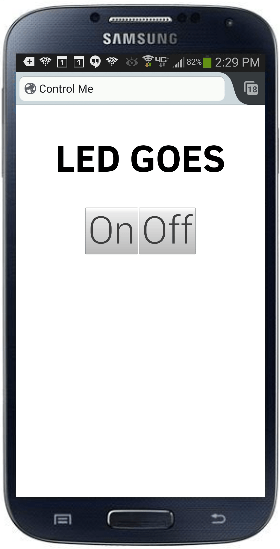
The BlinkMe control webpage has two buttons – on and off…

BlinkMe UI

Here is the HTML code for the controller page…

[code language=”html”]
<!DOCTYPE html>
<title>Control Me</title>

<script>
function send(s) {
r=new XMLHttpRequest();
r.open(‘GET’,’/cgi-bin/control.cgi?COMMAND=’+s+’&’+(new Date()).getTime(),false);
r.send(null);
}
</script>

<center>
<H1>LED GOES</H1>
<button onclick=’send(1);’>On</button>
<button onclick=’send(0);’>Off</button>
<hr>
</center>
[/code]

You can see that the on button has a send(“1”) and the off button has a send(“0”) wired to it. There is nothing special about the values “1” and “0” – whatever is in the send is what gets eventually to our code running on the Arduino.

Now let’s look at that code running on the Arduino side that receives these commands. Check out the loop function in BlinkMe.c

[code language=”c”]

void processCommand( const char *commandString ) {

  // Use the first byte to specifiy action…
 
  switch (commandString[0]) {
      
    case ‘0’:
     
    pinMode( LED_PIN, OUTPUT );
     digitalWrite( LED_PIN , LOW );      // Turn off the LED
     break;
     
     
    case ‘1’:
     digitalWrite( LED_PIN , HIGH );      // Turn on the LED
     break;
              
  }
         
}

[/code]

We are checking the first character of the received command and if it is “1” then we turn on the LED and if it is “0” then we turn off the LED.  Note that we are ignoring anything else that might be received after the “1” or “0”, and we fail gracefully if there is anything that is not a “1” or a “0”. This is important because people could theoretically send anything they wanted to the Yun over the open link and we want to make sure they that can’t cause any problems.

If you can’t wait to put this out in public, make sure you change the root password on the Yun to something besides the default of “arduino” or else someone can pwn your setup. To change the password, connect to the Yun over Wifi and pull up the admin pages at http://192.168.240.1/luci.

Tune in next time when we will add a slightly more complicated (and annoying!) feature!

FAQ

Q: Why not use the sketch /www subdirectory to get the HTML files onto the Arduino?
A: This feature seems to require you to have an SD card mounted and then you need to manually execute shell commands to get it to work. Just seemed easier to ECHO the files from an easily downloaded setup sketch. Please let me know if I am missing somewhere here.

Q: Why do you run a second uhttpd server on port 8080?
A: This secondary server does nothing but issue HTTP 302 redirects back to the primary server, which serves the control page. But why do we need this? Because we don’t know what page the phone is going to ask for, so we must be ready to serve a redirect for any page (including root). I could not find a good way to have a single uhttpd server that could both serve normal pages and also serve a CGI script for any other requested but not found pages.

Q: How did you get the control screen to pop up automatically upon Wifi connection?
A: This is easy for iPhones- as long as you give them a redirect when they ask for their magic “phone home” page, they will generate the login popup. Android phones seem to be more picky – none of the Android phones I tried will generate a popup if the redirect target webserver is on the same subnet as the phone itself. Instead the phone sits there and eventually says “internet connection is unstable”. To get around this, I use a DNSMASQ alias to send all web requests to the made-up address 1.1.1.1 just to trick them. I have never seen this documented before and even tried to find it in the Android isCaptivePortal source, but couldn’t. If you know where this behavior comes from, please let me know!

Q: Why are the buttons so tiny on my phone?
A: To keep things simple, I am using just generic HTML in these examples. In future episodes, we will use CSS to make the buttons look very nice on phones.

Q: Can I use this on other OpenWRT devices besides the Yun?
A: Sure! You can download a shell script that will directly set everything up here. Then you just have to change the /cgi-bin/control.cgi to communicate with your project how ever it is set up.

Q:Why is there a 300ms delay between when I hit the button on the webpage and when the light comes on?
A: This is caused by the mobile web browser waiting to see if you are going to double-click before sending the button press. We will fix this in later episodes.

Q: Can we do more than just turn an LED on and off?
A: Stay tuned!

Q: Is there any way to send data back from the Arduino to the web control page?
A: Stay tuned!

Q: Is there any way to log visits to the controller web page?
A: Stay tuned!

A platform for casual encounters with interactive technology – Introduction

This series of articles will show you how to easily take any Arduino project and open it up for anyone to control using their cell phone.

What can let people do?

  • Set the color of the lights on your X-mas tree as they walk by your window
  • Add their vote to a survey on a highway billboard as they drive past
  • Check the prices of items while standing in front of a store window
  • Turn on the street lights before walking down an otherwise dark alley
  • Check the temperature of the water in the community pool from the parking lot
  • Find their location and the location of others hiking in a park that has no cellphone coverage
  • Fire a water canon on your roof

We will use the Arduino Yun, which costs about $70.

The Yun will create an open Wifi network that anyone can connect to. When they connect, the a control screen automatically pops and they can immediately start interacting.

You do not need to know anything about Linux or shell scripts or Python or CGI or captive portals or IP chains. If you can make a blinking LED on an Arduino and can stumble though editing an existing HTML file, you know everything you need.

Just to get you excited, here is a project I made that lets anyone walking by control a digit of this giant clock…

It is surprisingly fun to control something that is big and far away.

FAQ

Q: Does my project need an internet connection?
A: Nope! Everything is completely self contained, so you can hide the board anyplace you can find power. In a later project we will even make a solar powered version that can live alone on the top of a mountain.

Q: Why not use m0n0wall or chillispot or another existing hotspot?
A: I tried to get some of the existing hotspots to work on the Yun but eventually it was taking longer than starting from scratch. This strategy is very simple and robust – perfect for a project you want to leave unattended for long periods of time. This is all about easy and reliable.

Q: What not use the YunServer/Bridge library functions?
A: I tried. At first, I could not fit both the YunServer and my application into the Arduino (Just adding the line “YunServer server;” to a sketch costs about 5Kb of memory!).  I spent a long time making my app smaller until I finally got everything to fit and upload, but then it would crash after a while. Turns out that the Bridge uses heap allocated C++ strings and so can cause you to run out of memory unpredictably at run time.

The mystery of the Zombie RAM

It all started one bright morning when I wondered: Can the RAM memory on an AVR chip continue to store data after power is removed? If it can hold the data even just for a brief moment, then that could be very useful in a project I am working on.

To test it, I wrote a tiny little program that would check for a a special value in RAM (a “magic cookie”) upon power up and light an LED if it saw the right value…

#include <avr/io.h>

#define MAGIC_COOKIE 0xee00ff55UL // Nice cookie to exercise bits

unsigned long ram_cookie;

void init0 (void) __attribute__ ((naked)) __attribute__ ((section (".init0")));

// This code will be run immedeately on reset, before any initilization or main()

void init0(void) {

    DDRD = _BV(0); // Enable output on LED on pin 19

    if (ram_cookie==MAGIC_COOKIE) { // Is the cookie there?

        PORTD = _BV(0); // Light the LED!

    }

    ram_cookie = MAGIC_COOKIE; // Load the cookie for next run

    while (1); // All done

}

// We never make it to main()

int main(void)
{
}

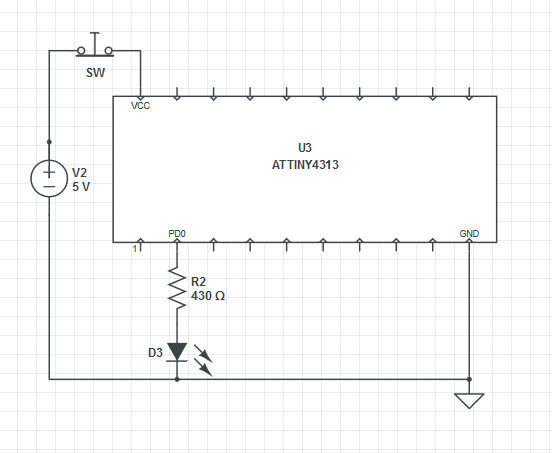
I also built a very simple circuit with an ATTINY4313 so I could try turning the power off for various amounts of time to get a feel for how long the memory would last without power…

RAM test circuit NC

The idea is that you press the button for a little while to remove power from the chip. If the LED goes on when you let go, then the “cookie” was still valid in RAM and so was safely retained while the power was removed. I was careful to try and make sure that there was no place that power could leak into the circuit when the button was pressed.

After only about 10 minutes of work I was ready to start testing!

Initial results were extraordinary. It seemed like the little AVR could reliably hold data without power for a very long time. I tested progressively longer and longer times, getting up to 10 minutes without power and each time it came back to life with the cookie still intact. My finger got too tired to test any longer.

I was very excited. If you could reliability store data in RAM for more than 10 minutes without power, then this could be a great alternative to FLASH and EEPROM memory in many applications. 10 minutes is long enough to safely change a set of batteries. Don’t get me wrong – EEPROM and FLASH are great and can hold data for decades without power, but they are also thousands of times slower than RAM and they wear out if you use them too much.

So I went ahead and updated my project to use RAM and connected it all up and… it just didn’t work at all. The RAM did not reliably survive the power loss. I was confused. I had to figure why it had worked so well in testing but not at all in the real application. What was different in the project? I slowly cut away parts of the full project until I was left with nothing more that original test setup – and it still did not work. Did I use the same physical chip that I had used the first time? Was there some way I was accidentally powering that first test? Had I accidentally left the debugger connected on the test circuit?

When faced with a really frustrating situation like this sometimes the best thing to do is goto sleep, so I did.

The next morning my mind was fresh and I was sure I would be able to track down the problem. I fired everything up and… now it worked! Ahhhh!!! What was going on? I was sure it was not working the night before and I had not touched anything between then and now. Argh.

So I went ahead and built another full circuit and, of course, again it did not work at all- just like the last full circuit. Luckily this time I had kept the test circuit built just in case. I fired it up and…. it didn’t work either! Ahhhhh! Now I had two not-working circuits and I was getting really, really confused.

Knowing now that I had not changed anything about the test circuit between it working and not working, I assumed the change must be something in the environment. Higher temperatures could plausibly affect RAM data loss since it could lead to higher thermal noise in the silicon. Humidity also seemed like a reasonable candidate since that could possibly allow more leakage current through the air.

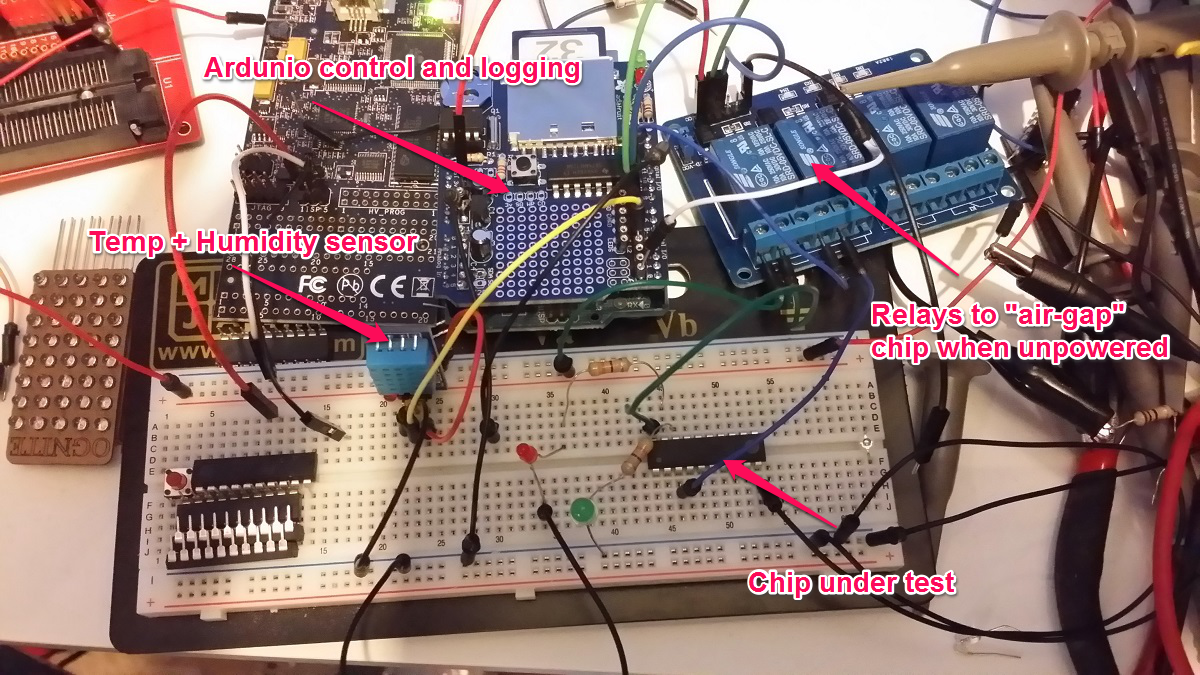
I frantically built an Ardunio-controlled rig that could automatically run continuous test passes on the circuit . It varied the power-off time for  each pass while logging the results along with the ambient temperature and humidity. I used relays to completely “air gap” isolate every connection to the chip under test while power was off to be 100% sure that I was not leaking current into it anywhere.

Automated Zombie RAM testing rig

Automated Zombie RAM testing & logging rig

I let that thing run for the rest of the day through thousands and thousand of test passes, but not once did the test circuit ever retain the data longer than 100ms without power – nothing like the 10+ minutes of persistence I was seeing before. I finally had to turn off the testing rig because the rapidly clicking and clacking relays were incompatible with sleep.

The next morning I got up and turned the test rig on again and immediately noticed that the delay between relay clicks was growing longer and longer – indicating successful passes. It quickly made it back up to 10 minutes of retention without a single lost byte. I let it run for a few hours more until the clicks started getting shorter indicating RAM errors. I had all the data from both runs logged, so now it was just a matter of figuring out what was different!

After a bit of number crunching it became clear that neither temp nor humidity were correlated at all with the data retention times. Not even a bit.

It took a good long hour before I finally figured out what was causing these spooky effects and now I can readily control the data retention time of my test circuit  – without even touching it.

Can you figure out what mechanism was at work here?

Turn the page to find out…

KickStarter On Track project management feature

The majority of crowd-funded product projects I’ve backed fail in predictable and preventable ways…

  • Ready, set, fail.
    They have everything ready to go for mass production with manufacturing and shipping partners. Once the campaign closes, manufacturer goes out of business taking lots of the money with them. They can not find new manufacturing partner because product really can not be made and shipped at the promised price point. Backers get back pennies on the dollar.
  • Too Much of a Good Thing.
    Real product and they know they can make 20 in the basement in a couple of weeks, but end up with 1,000 orders and no experience on how to ramp up. In the post campaign euphoria, they quickly waste most of the money frantically and inefficiently ordering materials and equipment. Years later the orders are still being filled slowly and sporadically.
  • Seemed like a good idea.
    Had built prototypes and all the remaining issues seem trivial. They aren’t. In the weeks following the campaign, they start trying to put together a final shippable product and find blocking problems at every turn. There is a reason no one ever made this product before – and it is not because no one ever had the idea. They end up shipping basically a box of parts that can not be realistically made into the promised product.
  • Someone else thought of it first.
    As soon as campaign closes, they get served with a patent cease and desist. The money is spent on lawyers.
  • Sucker.
    There is no real product – just a few paragraphs of text that sound superficially like a great idea. They take the money and run.

The root cause of all these failures is misplaced incentives. Founders get all the money up front, and so have absolutely no incentives to plan correctly, execute quickly or efficiently, or satisfy backers1.

These could all be mitigated or prevented by proper project management. I’d call it something like “KickStarter On Track” and it would be an opt-in feature.

Every KickStarter On Track project would additionally have a list of specific milestones, each with a date and a disbursement amount and recipient. The very last milestone would always be “Backers agree that project is complete”, and the disbursement would be any remaining balance to the project creators.

Some examples of milestones might be…

Date Milestone Amount Recipient
1/20/2014 Tooling and setup fees $1,000 Fei Wu Tap and Die
3/15/2014 Raw materials for 1st run $4,500 Sunny Day Plastic Corp
4/12/2014 Packaging and Shipping $1,200 Boss Fulfillment LTD
5/1/2014 Project complete (balance) Founders

Practical benefits of the On Track system:

  • founders do not see any money until backers are satisfied. You can still have project failures, but now the incentives are in the right places.
  • when projects fail, they fail quickly and predictably (at least compared to the infinitely long failure arc of the current system)
  • residual funds are available for an orderly refund process at each possible failure point

But I think the real benefit of the system is that is requires people to actually think concretely about these steps rather than just imagining their end goals. This can make all the difference.

Working World is a micro-lending non-profit. While they do provide money like lots of micro-lenders around these days, Working World is different. The money is ancillary to their mission. The real value they provide is project management. When a borrower shows up and asks for $500 to buy a new printing press, they ask stuff like…

  • When are you going to make your first payment?
  • Where will you get the money for that payment?
  • Do you have customers for these products?
  • How long will it take you to print these products once you get the press?
  • Do you know how to operate the press?
  • Do you have ink?
  • Where will you get money to buy the ink?
  • Where will you get money to fix the printer when it breaks?

They don’t know anything about the printing press business, but often just asking the questions will completely change the outcome of the loan. By nailing people down to common sense specifics (“If it will take you 1 month to complete your first order, you can’t make your 1st payment in 2 weeks”), they end up making much more realistic loans and have fantastic repayment rates.

Why would KickStarter do this?

Eventually people like me are going to get tiered of funding failed projects.When that happens, the party is over.

This could also help KickStarter differentiate themselves from other crowd funding sites and offer a high value, low risk experience to backers.

Finally, they could charge an overhead management fee that would be an additional revenue stream.

Why would a founder do this?

The obvious reason is that it will make the campaign more attractive to backers. Less obvious is that (I think) most founders are well intentioned and they want their projects to come to a happy completion. Hopefully they will welcome any help they can get.

Who would decide a Milestone has been reached?

The crowd-ish way would be to to have backers vote on it. Want the backers to approve your “completed molds” step? Invite them to a meeting where you let them touch them. When 30 backers tweet and Instigram about how awesome the molds came out, the rest will happily agree. This crowd auditing system is very hard to cheat and leverages the best of crowd wisdom. You’d want to build a nice site to make all this interaction easy, but KickStarter needs this anyway.

Any time a milestone date expires, the default action would be to refund the balance of funds to backers. Backers could also consent to extending deadlines if the founders could convince them to.

Couldn’t you do do this as an external site not affiliated with KickStarter?

Sure! You would need to get people to trusty you – which you could maybe do if you are already an established project management entity.

KickEnder.com would be a great domain- alias, it is taken.

Let me know when you get it up and running!

###

1 Ok, they may have some non-financial incentives like being good people, and having good intentions, and wanting to reserve their reputation so they can successfully fund future campaigns. In practice, these non-financial incentives do not seem help much once the campaign is over and the money is gone.

PayTrustExport still works after all these years – and how to put the post office out of bussiness!

I just got my 2013 archive CD from PayTrust, and the PayTrustExport tool still works!

If you use PayTrust, you should use this tool to make an unencrypted backup copy of your data.

While I am glad the tool still works, I am very sad that they have not done any meaningful work on this system since Intuit bought it back in 2005. With a tiny bit of effort, they could save us users thousands of hours of work and frustration.

Considering that the US Post Office is going out of business, I think there could be huge value in services that divert traffic away from the mail system. PayTrust is well positioned for this play.

In case you don’t know, PayTrust is a system that lets you receive your paper bills online. They give you a special postal address somewhere in South Dakota and you set up all your bills to go there. Every time a bill arrives at PayTrust, they open the envelope and scan the bill and then email you.  You never have to touch the paper (or possibly loose) the paper.

If I owned PayTrust, I would make some very easy improvements to make the system better, and then immediately make it free. Even in its current dilapidated state, it still saves me significant time every month and if it were actually good and free, I think huge numbers of people would start using it.

With a large number of users receiving their paper bills though the system, I’d be in a unique position to start diverting paper mail.

Fist step would be to run a report of the top billers sending paper into the PayTrust scanning center. Then I’d start making very easy phone calls….

JOSH: “Hello American Express! This is Josh from PayTrust. I see from my report that you mailed 100,000 bills to my processing center last month. You paid an average of $0.30 per piece in postage to mail these to me- that’s $30,000 in postage last month – $360,000 last year! I also see that 5% of the bills you sent never even made it to me, which makes your customers sad. How about next month I just send a truck to your mailing center to pick up all the bills addressed to our common customers?  I also promise to have all the bills you give me delivered to your customers within 24 hours after I pick them up rather than making them wait the extra 2-3 days they typically spend in the mail.”

AMEX: “So, you are saying that you will save me $360,000 a year in postage, and you will eliminate my problem with bills lost in transit, and you will get the bills into my customers’ hands 2-3 days sooner? Sign me up!”

JOSH: “Done! Listen, if you are interested, I can also save you the $300,000 you spent on ink and paper to print those bills. I just have to scan them in anyway once I get them, so it would save both of us a lot of work if you just gave me a download every day of all the bills that you would have printed and loaded onto my truck. You might even be able to shut down a few of those crazy expensive high speed printers too! I can send my computer people to talk your computer to work out the details, but it could be as simple as you just redirecting the output from your printer to PDF files. We do this all the time and know all the tricks, so we will make it be super simple and easy for you!”

AMEX: “Wholly cow that would be awesome! We hate those printers, they are so frickin’ loud! Thanks Josh!”

See what happened there? 100,000 pieces of mail completely diverted from the USPS’s trucks and trains and planes. Millions of sheets of paper saved.

Everyone is better off – Amex saves money and is able to focus on what they really do rather than printing and mailing, the customer gets the bill sooner and with higher reliability, and PayTrust saves having to scan and store all those paper bills. The only apparent looser is the USPS, but considering how unprofitable they are maybe having less mail will help them to lose less money.

Repeat the above steps for everyone who is sending bills into PayTrust and soon you will reduce the flow of paper bills to a trickle. Yeay.

There are some other interesting angles, too. PayTrust could also get into the paper bill mailing business. I know this sounds backwards, but bare with me. This requires buying, building, or renting  a huge bulk mailing operation – basically a bunch of very fast printers scattered around the country near the postal distribution hubs.

Now can call Amex and say…

JOSH: “Hello Amex! I hope you have been enjoying the 100,000 fewer paper bills per month as much as we have!”

AMEX: “We sure have! I just wish we could get rid of all our paper bills!”

JOSH: “Funny you should say that- the reason I am calling is to ask if you’d like to just send us all your bills as PDF files. We will handle the details and deliver the ones to PayTrust customers electronically, and the other ones we will print and mail for you. You are already spending $0.60 each to print and mail these, but we can do it for you for $0.25 per bill. Interested?”

AMEX: “Wait, just the postage to mail these is $0.30, and you are willing to print and mail them for $0.25? Done! We will start sending you all of our PDF files tomorrow! You might want to check ebay tomorrow for our giant printers- you are going to need them!”

So how do I stay in business by charging $0.25 for something that costs $0.60? Two ways…

On every bill I send out, I add a cover sheet that says…

You can also view this bill online anytime at http://paytrust.com/567H8S5

When the person goes to that URL, they see their bill on the screen (I already have it in digital form from the PDF file). There is no security exposure since  they are seeing the same info that is on the paper bill, which they must have to know the URL. At the bottom of the page it says…

Enter your email address here to receive an early copy of this bill via email 3 days before it comes via postal mail.

With no downside (they still get the paper bill same as always, just now also get email a few days sooner), many people who are otherwise reluctant to switch to ebills will sign up. Once that is done, the cover letter on their future paper bills will say something like..

You should have already gotten the email copy of this bill a few days ago. Are you tiered of opening envelopes and sorting papers? You can now choose to all your PayTrust paper bills mailed to you in a single envelope once every week, month, or year. You will continue to get your early email copies like you do now, and will also get the periodic backup paper copies to keep – already sorted and ready for you to file away.

Again, no downside and lots of value for the customer, so many people will opt for this. While I am still printing and sending paper, I am paying a lot less in postage because I can now put many bills into a single envelope, aggregating both multiple bills from the same sender and multiple bills from multiple senders into a single periodic envelope. It is much cheaper to mail 1 envelope with 20 pages in it than 10 envelopes with 2 pages in each.  In the case of a person who ops to get all the backup copies mailed to them annually, I can send a single Priority Mail parcel with 500 pages of bills for about 1/10th the cost of sending sending 100 bills of 5 pages each via First Class.

The final step, of course, is the cover sheet on the periodic aggregated pack…

Here are the backup paper copies of your bills. Did you know that we can store these copies for you, and we will then send them to you immediately whenever you need them? And it is free! Just visit http://paytrust.com/freestorage

Again, if I do it well (always printing sending out backup copies the same day people request them and even offering to print them instantly at a local FedEx if needed), then I will end up almost never actually having to print bills.

The end game, then, is moving a huge amount of mail into electronic form and, at each step of the way there, both sender and receiver were better off and did not have to give up anything that they wanted. Compare this to the current path from paper bill to ebill, which requires work to log into the website of each biller and figure out if they even do ebills, then find the way to opt in, which almost certainly will immediately terminate your paper bills forever.

If anyone at PayTrust is listening, please call me and let’s get this done. Come on PayTrust, let’s save some trees (and trucks)!