Cloud backup for Windows 8 with no 3rd party software?

When I first started Backup-Coop more than 10 years ago, there was no way to backup a PC to the network. For reasons outlined here, I thought (and still think) that cloud-based backup is essential.

Since then, there have been many fine could-backup systems released including Mozy and Crashplan. I’ve used both, and both work fine. Unfortunately, neither are perfect and I really want my backup program to be absolutely rock solid and never do something unexpected or unexplainable. Neither Mozy nor Crashplan fit this requirement. Both Mozy and Crashplan have done unexpected things to me. Mozy once decided to fill the hard drive with so many huge temp files that it crashed the machine. Crashplan once got into a loop where is was stuck “connecting” for a month with no clear way to break out of it.

Surprisingly Microsoft has never released a cloud backup solution as part of a consumer Windows version. This is despite their recent huge pushes into the cloud with offerings like Office365 and SkyDrive. They do offer a very nice looking cloud backup solution for server versions of Windows that connects to their impressive Azure cloud storage system. Why not offer the same for Windows 8?

I decided to try to roll my own cloud backup system without installing any 3rd party software – I’d only use code that comes with a normal Windows 8.x installation. It turned out to not be too hard.

Luckily, there is a new feature called File History that seems to do exactly what I want – copy periodic snapshots of your files to a backup drive. Now I’d just need to find a cloud storage host to copy these files to…

My first choice was to use Microsoft’s cloud storage platform, assuming that getting Microsoft to talk to Microsoft would be the easiest and simplest way, right? Microsoft’s SkyDrive seemed like a perfect fit because it is free and Windows 8.x already knows how to mount SkyDrive as a local drive. Unfortunately when I tried to get File History to use the SkyDrive drive, it flatly refused with a very unhelpful message “File History can not use this drive”. I could not find any documentation anywhere about what requirements File History has for its target drives, but whatever they are it seems that SkyDrive doesn’t cut it. My (wild?) guess is that File History wants to see an NTFS drive, but I’m not sure why it would *need* that.

I decided to use Amazon’s EC2 service for the cloud storage, mostly because it is easy and free (at least for 1 year and 30GB of storage). I set up a “t1.micro” instance with Windows 2012 server running on it, and then set up a share that I could access over the open internet. The EC2 service has gotten really nice lately, and this whole process only took about 15 minutes of my time.

On my Windows machine, I mapped a network drive to the new share I set up in the cloud and then pointed Window’s File History service to this mapped drive. It worked, and the machine started to backup up to the cloud!

Image

It was actually quite fast too, uploading at a rate of about 100GB per day.

So am I happy with this solution? I am not. It appears that File History does not back up open files – although I can not find any documentation about this anywhere. I know that when I look at my File History backups, they are missing my open Outlook PST files. These are probably the files that I most need to have backed up on a regular basis, so this solution is not going to work for me. It might be a viable solution for someone who does not have files that are always open, especially with less than 30GB since this should be free on Amazon.

Next maybe I will try BackBlaze. I can’t believe there is not a perfect Windows cloud backup solution out there – this is not that hard of a problem. Suggestions?

Marketizing dentist appointments

I just tried to make a dentist appointment and it sucked. There are never any available slots when I want them, and it is even more frustrating because I know that many of the people reserving those slots are going to end up canceling or not showing up.

This is because all appointment slots costs the same, and in this case the cost is $0. Note that I am talking about the slot and not the actual service you get once you are in the chair. Anytime the costs of something is too low, people will waste it and there will not be enough supply.

The dentist currently crudely compensates for this by overbooking slots, which means I usually have to wait when I show up on time for my appointment

Slots should cost money.

The dentist should figure out how much a slot costs him – that is, how much is does it cost for him to have the office open and all the people and equipment ready in case I do show up for my slot. He should sell the slot for more than is costs him. This way, he is happy if show up or not. Now no-shows become a profit center rather than a hassle.

It is likely that some slots should initially cost more than others. It takes an hour to drive in from New Jersey at 8AM, but only 20 minutes at 10AM, so 8AM slots should be priced high enough to reflect the higher cost of providing them. Then people buying the slots will implicitly tell the dentist if it is worth it for him to sit in traffic on any given day. Some dentists and staff might even be willing (happy?) to work though lunch hour if they were getting paid double.  Right now there is no feedback to the dentist about how to efficiently schedule his time to best balance his preferences and those of his patients.

Slots should also be transferable.

Tuesday afternoons are normally very popular and slots then so might cost $200. I buy one for a month from now, but as the date approaches I see that it is going to rain that day. I offer to sell my slot for $100 and take the loss, while someone who lives close to the dentists gets to pick up my choice slot that otherwise would have been to expensive for them.

The dentist might sometimes even want to buy back his own slots in the secondary market. If I have the only sold slot on a Friday afternoon, it might be worth it for the dentist to buy that slot back from me for double what I paid for it so that he can head out to the Hamptons at lunch time.

You can easily imagine websites to facilitate both the initial sales and the secondary market for these slots.Heck, there might even be derivatives markets where you could buy and sell options on slots.

All this would work for restaurant reservations too.

UPDATE 12/2/2014:

New company doing this!…

View at Medium.com

A spam more than 13½ years in the making

On 3/13/2000 at 9:38:25 AM, I bought the Bundesbahn Pi font from Adobe (yep, back then they were a font company).

On 10/31/2013 at 11:36:01 AM, I got a spam because of that purchase.

I knew that the spam was Adobe’s fault because I give everyone a very special email address. I never give out the same address twice and I keep track of who I gave each and every address to. This way, whenever I get a spam I can look up what address the spam was sent to and know who to blame.

Sometimes companies leak an email address on purpose by selling their customer list. Sometimes they do it unintentionally when they accidentally publish the list in a public document. But usually the leak happens because of a a security problem – either someone with access to the list got a virus, or the servers that hold the list got hacked into. Sadly, it happens all the time.

I was therefore not surprised when I saw Adobe’s announcement that they were hacked. At least they found out about it and acknowledged it.  Most of the time when I get a spam on a special email address, the company that leaked the address is unaware and uninterested.

Here is the telltale spam…


From:    Oolya <noreply@aagkahjkaezkahzfga.facebooklmali.in>
Sent:    Thursday, October 31, 2013 7:36 AM
Subject:    Olechka How is it going?

Hello!!! My name is Olia! I look for a second half. I love fitness and arting.. Reply me letter on 
grigoreyvaolga@poczta.onet.pl Regards, Olia.

If you’ve ever given your email address to Adobe, you probably got a spam like this too.

If I were a big company, I would sprinkle lots of special email accounts and username/passwords around my systems, and then keep a very close eye out to see if they every get used. At least this way I’d know something bad was happening, and maybe I could use the info about what got leaked and when to figure out what happened.

Marketizing CitiBikeNYC – No more full stations

UPDATE:
As of 5/16/2016, this has come true! Well, sort of. Points rather than money and generally much less than what I think is justified- but it is a start!


There is nothing worse than arriving at your destination only to find the station full. 48 docks… and no where to park. You are stuck with the bike and you can’t do anything else until you find a free dock.  The free dock hunt is frustrating and sometimes kills any time saved by taking the bike in the first place.

So many docks and no place to park

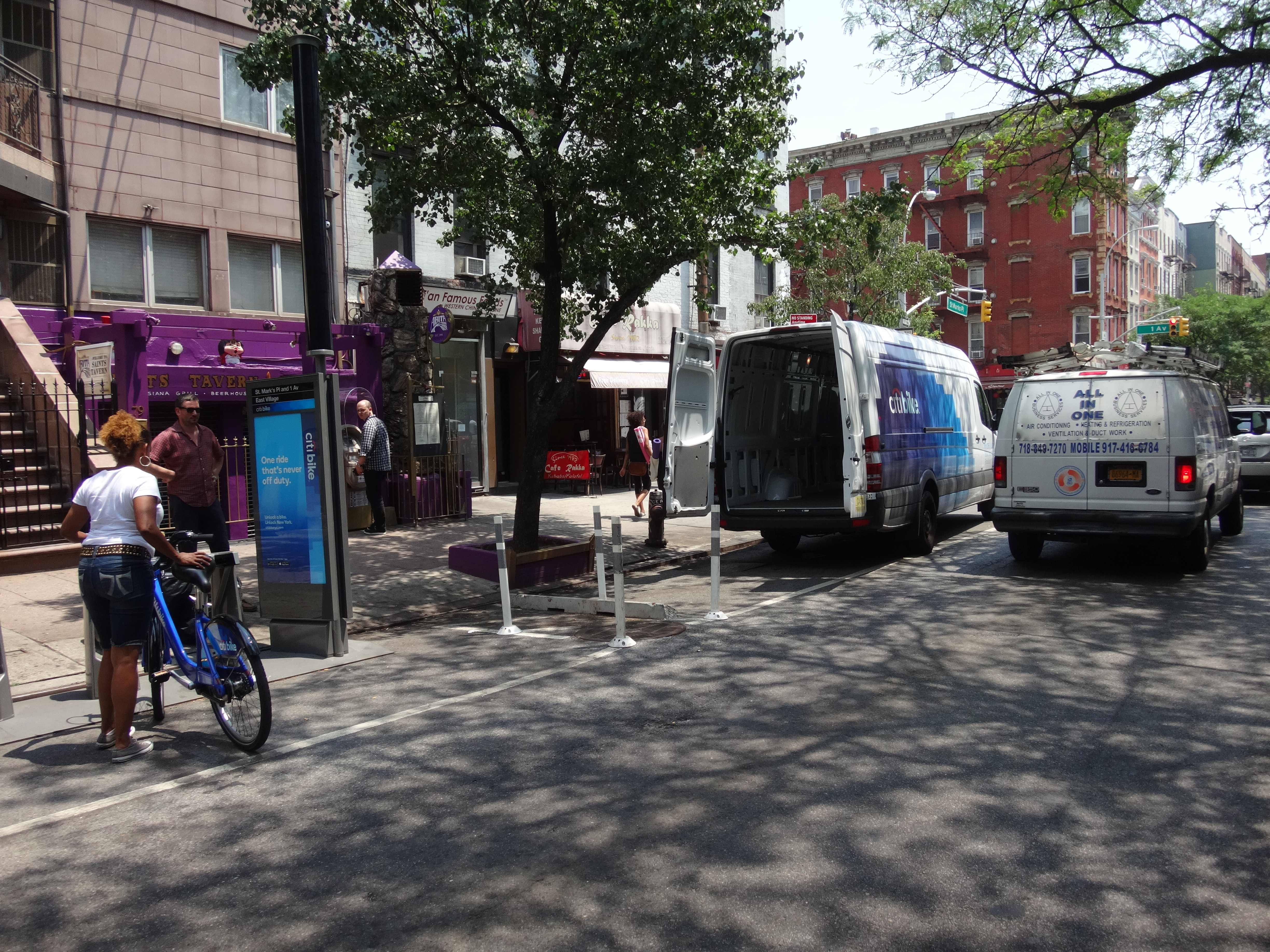
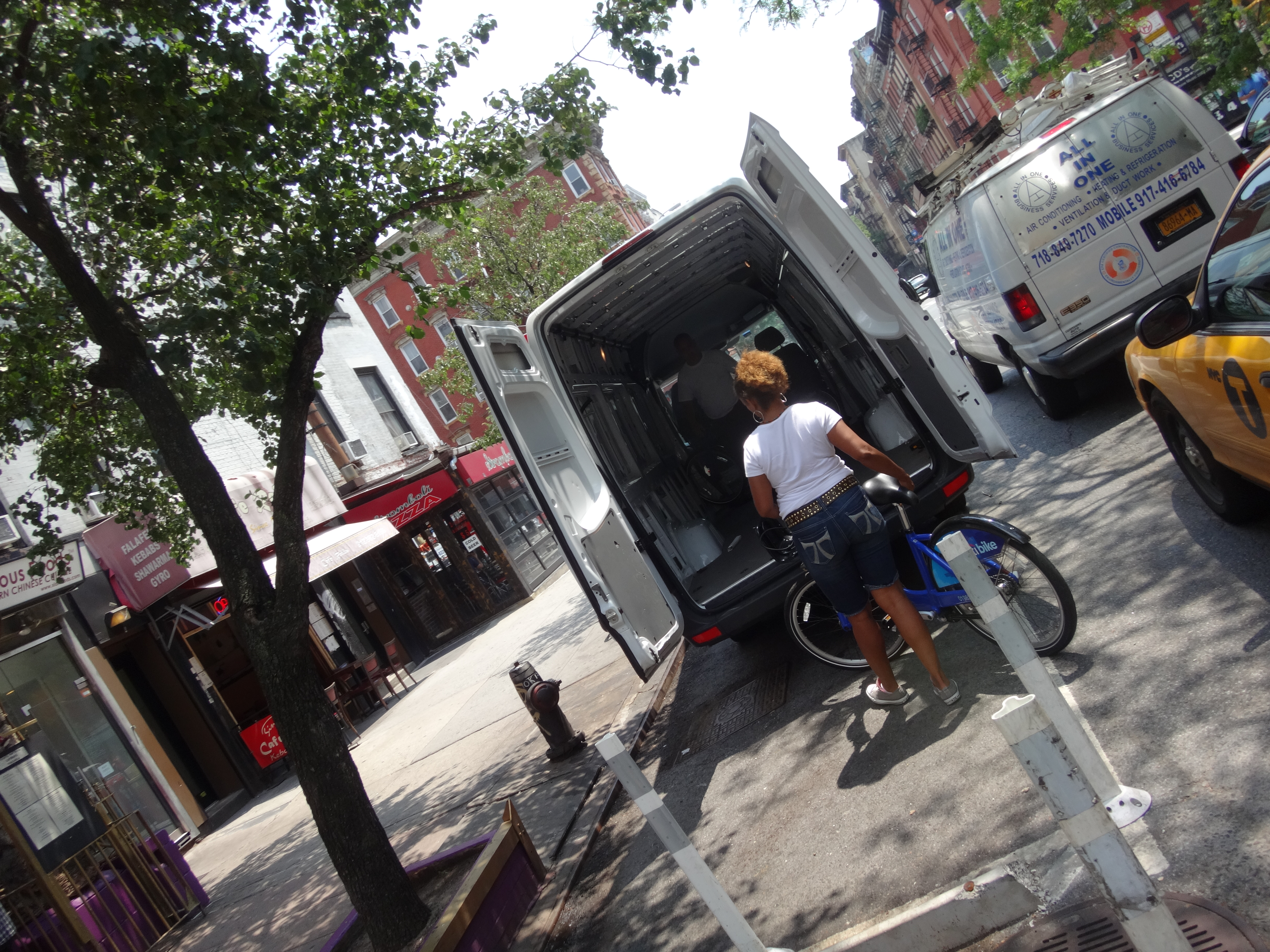
They do send around fancy CitiBike vans to move bikes around, but the effort is futile.

DSC03630 DSC03629

Having people driving vans full of bikes around NYC is wrong in so many ways.

I’m guessing that keeping one of those vans on the road costs $100k-$200k per year (think about the salaries, gas, insurance, and depreciation to start). I’d also guess that each van can only move 10-100 bikes per hour. There must be a better way.

I always prefer a distributed, market-based solution. Short term…

New CitiBike Rewards Plan:

  1. Take a bike from a full rack

  2. Return to a different station with at least 2 empty spaces

  3. Get a $5 reward!!!


Simple. The $5 bounty would automatically get applied to your CitiBike account. Do it one every couple of weeks and your annual membership is free. Do it more, and you have a new (fun!) job.

If you don’t have an account, then the trip would just be free. Same checkout procedure as a normal day trip, but when you return the bike to a non-full station you just don’t get charged the normal fee.

First step is a simple software change in the billing system. Quick and straightforward to implement. It could even be done as an offline system that searches for qualifying trips after the fact and then applies a credit to the account.  You could start the new policy immediately and bring up the software later, applying the credits and refunds retroactively when the software is ready.

Immediately the number of frustrated people not able to return a bike drops.  Huge win for almost no work.

Next step would be to add a…

Alert me when I am within [500 feet] of a full station

… feature to the CitiBike app, just to make it even easier for interested people to collect. In the meantime, if CitiBikeNYC says it is ok to use their data, I’ll happily write a Show Me The (Bike) Money app for people to use until the new CitiBike app is ready.

Next step is to add a bounty for returning bikes to empty stations. This is not as important as the full station bounty (real and mandatory costs of not being able to return a bike are worse than the opportunity costs of not being able to borrow one in the first place), but could still be very effective in keeping bikes well distributed throughout the system.

Next step would to be bring some dynamic pricing into the system so that the bounty is high for really valuable moves (apparently downtown Brooklyn to Chelsea on a Sunday night) and low for not so valuable ones (Cliff Street to Fulton Street ever). Update the app with a new option to…

Show me all bike rewards more than [$25] ranked by [nearest to me]

Start using demand prediction to get ahead of the curve and move bikes before stations are empty/full. A predictive/reactive self-balancing system without heavy fixed costs like vans and bike wranglers, and a new class of professional bike riders. Please?

UPDATE 8/24/16

London Citibike could use some marketizing too…

2016-08-22 19.23.16.jpg

OrsonObject – Google for your lost keys

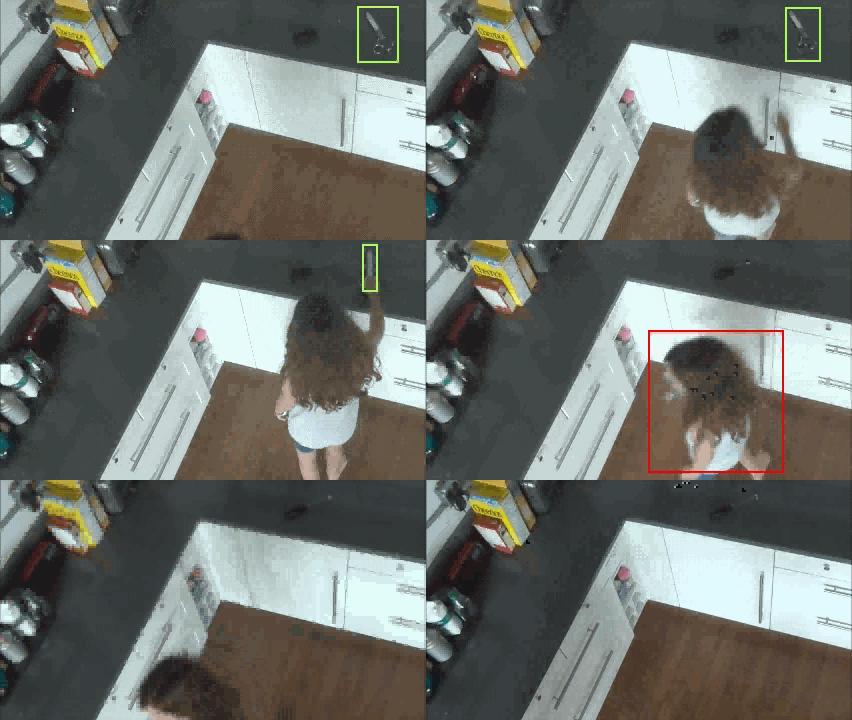
A combination of hardware and software that would keep track of all your belongs inside your home. If you wanted to find (say) your scissors, you would just search for them on the system and it would tell you where they were last seen.

right with object detection

There have been a spate of systems that try to solve this problem by attaching a piece of hardware to each object to be tracked, but this would be impractical and expensive for more than a few objects.

OrsonObject would be pervasive and, once set up, would automatically keep track of everything by tracking objects by their appearance. To set up the system, all you would need to do is install a bunch of tiny cameras around your home such that they had a pretty good view of almost everywhere. This is not expensive or as much of a hassle as it sounds- there are systems like VueZone with tiny wireless cameras that you stick onto the wall with double sided tape.

wire-free battery power gives you instant mobility

I am not a big fan of the VueZone system specifically, but it shows that this technology is nearly ready. Since the OrsonObjects system doesn’t need to stream video, it would be possible to make the cameras even smaller and cheaper.

The cameras would automatically take pictures whenever anything happened in front of them- typically you moving stuff. These images would get uploaded to cloud-based servers in the background. These servers would use continuous recognition to find and any objects and track their movement throughout the space.

This is hard, but possible (or almost possible). People have made a lot of progress in automated object recognizers lately. Since the processing is all done off-line, you could bring to bear huge, cheap computational resources to do the recognition and tracking.

The user interface to the system would look a lot like Piccassa’s face view, showing a list of all recognized objects. You could sort the list by things like object size, most recently moved, or most often moved. You’d click on the object you are looking for and it would bring up the last time that object was moved – directing you to the object’s current location.

These system could be extended to recognize objects that are often used together and group them logically into sets. It could keep track of most used objects and predict when you might need an object based on what other objects you are currently gathering (he has the coffee grinder…. and the sugar… which usually means that next he will need the filters also- which I last saw in the top drawer) and suggest their location to you when it seams like you are looking.

Looking ahead into the future, the system could be expanded to also manage the location of objects for you. You’d have a piece of furniture that looked like a large bureau. It would have a large, easily accessible shelf top in front. Anytime you were done using an object, you would drop it on the shelf and the system would automatically store it inside. Objects would be stored much very efficiently than you could in normal drawers and cabinets since the system could put every object where it fit best. Objects would be retrieved in seconds any time you needed them. This would save users both time and space.

UPDATE 5/24/15-http://www.wired.com/2015/05/next-roomba-may-recognize-crap/

UPDATE 12/31/2016 – http://www.theverge.com/2016/12/30/14129576/microsoft-hololens-key-finding-milk-tracking-patent


Citibike Key Fob Brain Transplant

UPDATE 12/9/2013:

You can now get a key card directly from Citibike!

UPDATE 8/13/13:

Looks like they’ve changed the way the chip is being installed, so this method will not work for newer FOBs. I’ll post back once I figure out a new good way to get the chips out.


I love CitiBikeNYC but the key fob doesn’t fit into my wallet and I don’t carry keys, so I removed the tiny chip from inside the fob and put it inside my credit card. Now I am much happier and don’t  have to carry anything extra around to use CitiBike.

.CitiBike Conversion

It only takes about 5-10 minutes of work.

1. Open your key fob using a mat knife. I just carefully kept running the blade across the seem around the edges of the fob, scraping a little plastic out with each pass. After a minute or two I was able to wedge the blade into the crack and pry the halves apart.

citibike scrape
click for (long) video

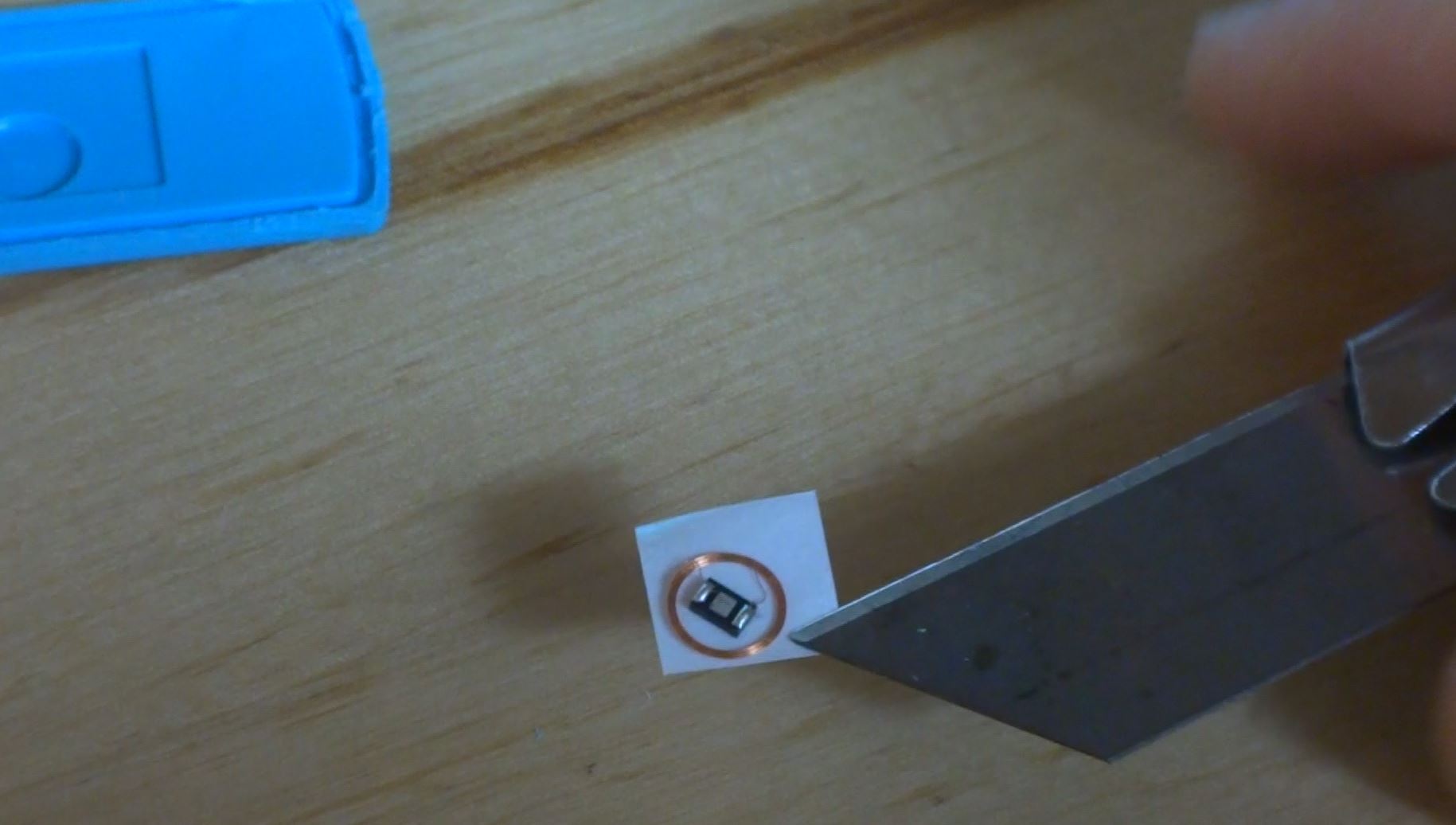
2. Carefully take out the square of tape that has the RFID chip stuck to it. Be really careful not to hurt the tiny wires.

citibike remove chip

3. Drill a hole in the bottom right corner of your credit card (so it will still work. A 3/16th bit is perfect. I sandwiched the card between one half of the fob shell (as a template to locate the hole)  and a block of wood. If you also have a larger drill bit too, you can twist it in the hole with your fingers to clean up the sides of the hole.

citibike drill

4. Stick the RFID chip and coil into the hole by sticking the tape to the back of the card.

5. Mix up some epoxy and put a drop of it on top of the RFID chip in the hole to protect it. I used DevCon 5 minute epoxy that I got from the hardware store and it worked great. Mix up more epoxy than you think you’ll need.  I used a disposable chopstick and soy sauce tin that came with dinner last night. Don’t be afraid to use the chopstick to smear the drop of epoxy around to make sure it covers the chip and fills in the hole and even spreads out a little over the lip of the hole.

epoxy
Click for (long) video

6. Let it sit for maybe an hour to let the epoxy dry, and then go borrow a bike!

You can get all the tools you need for this project at the Seaport Tool Library.

Here is the 6 second version…

CitiBikeNYC Dead Batteries

The batteries are dying. Today I saw a CitiBike van driving around swapping out the batteries in a few dead kiosks in my neighborhood. They use normal 12 volt lead acid batteries, like a big car battery but deigned to be more deeply discharged (sometimes called “marine” because you use them on boats).

Once a kiosk battery is dead, you can’t get or return bikes there. Particularly problematic is that when you try to dock a bike in a dead kiosk, it feels like it locked in- but if you pull hard enough it will come out again.

If you leave your bike is a dead kiosk, best case is that you will not be able to get another bike without calling the 800 number to reset your account. Worst case it that someone will take the bike and it will be a big hassle.

Always wait for a light after you dock a bike. If you don’t see a light, pull really hard on the bike to pull it out and then try another dock or even another kiosk.

I can’t believe that this is how the system is designed to work, so either New York streets are darker than expected (so not enough juice is coming from the solar stalk), or the kiosks are getting much more use than expected (using lots of power), or both.

CitiBike should act fast to solve this problem because goodwill is eroding fast. The system needs to be perceived as reliable to fulfill its goal of being a utility. Once you hit a tipping point where people give up, it is very hard to get them back. We are close to that point.

In the very short term (days), this could just mean raiding every Sears in the tri-state area for deep cycle batteries and wiring 2 or 3 or 4 of them in parallel in each kiosk. There is plenty of room in the box, and this could stretch the operating time long enough that the station would stay up continuously between swap visits.

Distributed systems are usually faster to deploy than centralized ones, so CitiBike could also start deputize local shops or residents to be responsible for swapping and charging the batteries in their nearby stations every day. The total capital investment should be less than $200 per station for a charger. They would have to trust these new deputies with the key to the kiosk cabinet, but dire times call for dire measures. If they cooperated with someone like RPA , I bet they could get this up and running on the worst stations in the next few days.  All it would take is one phone call and key/battery drop to me and all the problem stations in Fidi would be covered (I already have a charger).

Longer term, the station either needs to make more power or use less.

Adding more solar panels could help make more power and I have had especially good results with some of the amazingly cheap and efficient crystalline arrays you can get now on Amazon. These can generate power even in indirect light and adding a couple on the top of the solar stalk could be enough to make some marginal stations stay up continuously.

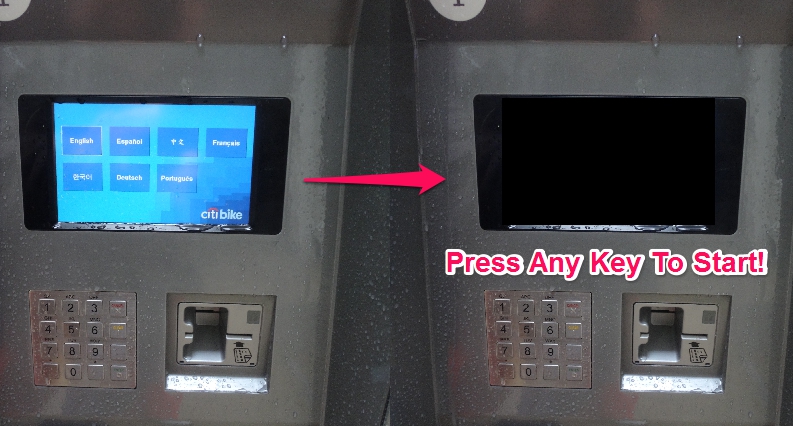
My guess is that the screens are the big power users in the station. These should be off unless someone is actually interacting with them, rather than running continuously in “attract mode”.

In the short term, you could solve this problem with just a couple of decals and a few lines of code. The decals would instruct people to press any button on the keypad to begin. The software change would involve having the screen sleep after a few minutes of inactivity, and then wake on any keypress. A little extra work could probably sleep the swipe and PayPass readers too for more power savings.

citikiosk

Slightly longer term solution might be to add a physical blinking “start” button to the kiosk to wake the screen. This would involve drilling a single hole, attaching a pair of wires, and sticking on a decal. The blinking light is nice because it attracts attention and advertises that the station is live. Hardware cost less than $25 and probably less than 10 min of labor to install.

Or you could get rid of the screen altogether and replace it with a sign that says “Goto http://getbike.info or call 888-RENT-BIKE to rent a bike!”. Heck, put a sticker with the address/number on every dock and now people don’t even need to goto the kiosk at all. Multiple people can rent from the same station simultaneously rather than waiting on line (or, more, likely walking away) while the poor tourists try to figure out the system . If you did this, the system in the station now does nothing but lock and unlock bikes based on a cellular data connection, so you could probably replace the (power hungry and expensive) embedded computer in the station with an off the shelf cellphone that just had a USB interface board to connect the phone to the docks. Something like this would use so little power that it could run for weeks in the dark off a single battery, and almost certainty be cheaper and easier to source than the current embedded system.

Once you got the price of the control system down to less than $500, you could even start deploying “micro” stations with 3 docks and no kiosk. These could be totally mobile since – a flatbed could drop them  into individual parking spaces in a couple of minutes. Great for testing demand in a potential new location, or  just quick response to filling in gaps in suddenly busy areas. These stations would be so mobile that you could even relocate them daily, and each would have a GPS linked cellular connection to the CitiBike system so they would show up the app the moment they hit the ground.

UPDATE 9/5/2016:

This has been implemented with a physical blinking “start” button!

2016-09-03 15.13.49.jpg

NYC CitiBike Token – What’s Inside?

Just got my new CitiBike token… and was wondering why it is so big? (I’m really wondering why I have to carry anything at all. Can’t I use a PIN code or unlock the bike via an SMS or something? Anyway..)

I don’t carry keys, so this giant token is kind of a hassle. Let see what’s in there…

OUTSIDE:

Image

(Yup, I am a founding member!)

INSIDE:

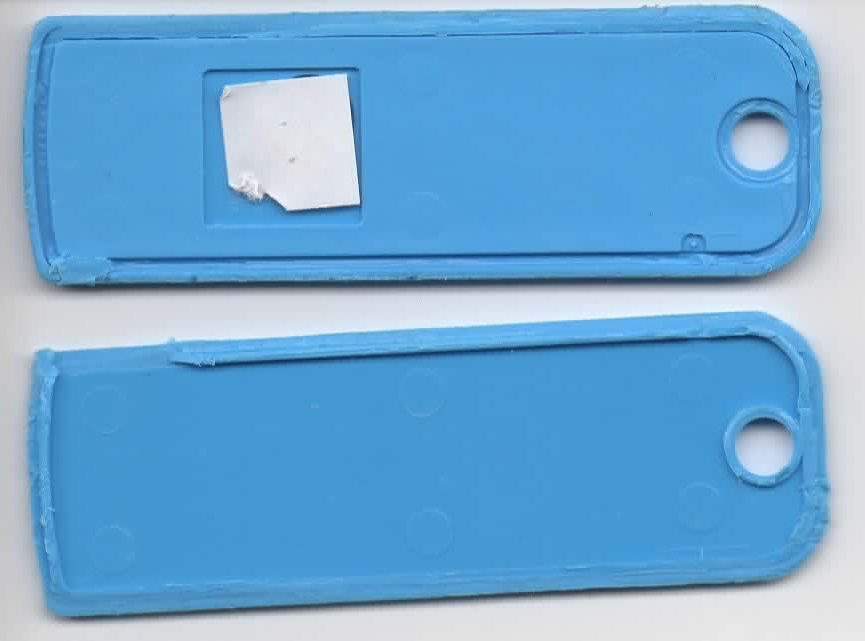
Image

Nothing but plastic and a tiny 11.5mmx11.5mm piece of white tape.

Peeling back the tape, we see where the magic happens…

Image

I don’t envy the elves who have to solder those coil connections. I wonder if that extra single small loop near the top connection point is functional, or just an artifact of the construction process.

After a half hour bath in a capfull of alcohol, the tape slid right off…

Alcohol bath

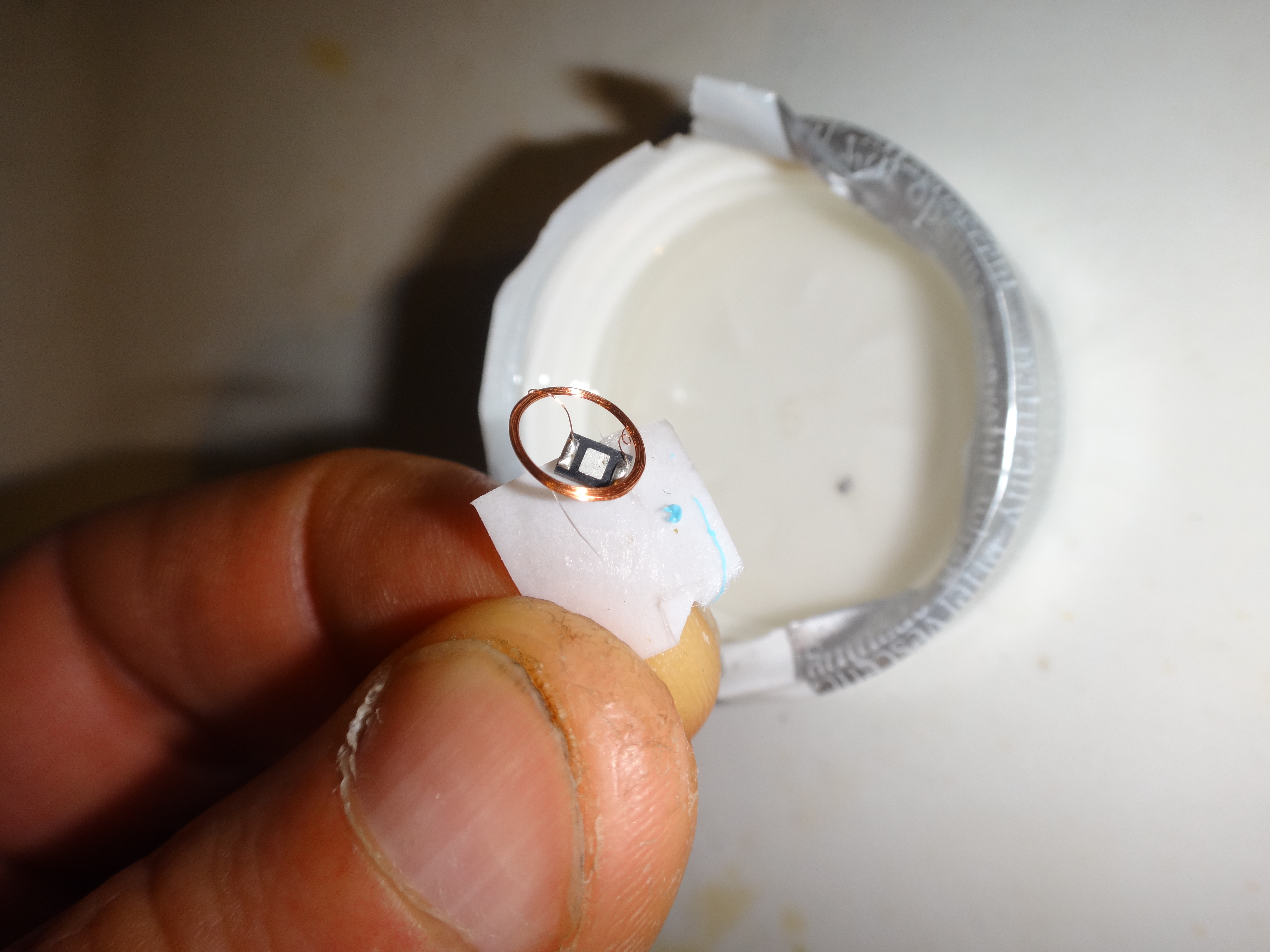
And close-up of the newly liberated chip and coil…

picture003

The chip dimensions are 3.5mm x 2.2mm and it is labeled SY2U 272.

Tune in next week for instructions on how to do an RFID chip transplant!

Elevator power usage – should I take the stairs?

I’ve always wondered how much power elevators use and how efficient they are. This seemed like a perfect job for the new TED Pro 3-phase power monitor.

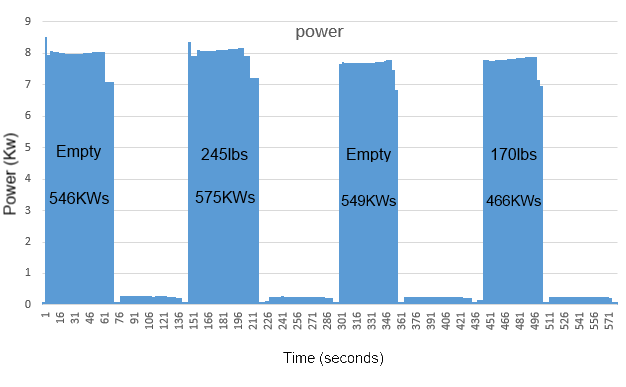
I hooked up the monitor and then sent the elevator up and down a couple of times empty and with two different weight loads…

powergraph

Big bars are the elevator going up, short ones are the elevator going back down.

Interesting observations:

  • The elevator controller uses about 83 watts all the time, even when the elevator is idle. That’s about $130 per year without even moving!
  • Going up uses almost 40 times as much power as going down.
  • Going up 5 floors uses about 500 kilowatt seconds and costs about $0.03.
  • It does not seem to consistently take more power to lift a full elevator than an empty one.
  • It takes more power to lift an elevator that has been sitting idle for a while than one that is “warm”.
  • My guess is that there is more friction on a “cold” elevator because each use lubricates the piston. This would also  explain the energy spike at the very beginning of the first two lifts as the the elevator breaks the initial static holding friction.
  • Going up with a load takes a few seconds longer than going up empty.

Notes:

  • This is a hydraulic lift elevator. The total travel is 5 floors/55 feet. I weigh about 170lbs.
  • I used my local ConEd electric rates of $0.18/KWh ($0.10/KWh for power, $0.08/KWh for delivery).
  • The elevator slows down as it gets close to the target landing so that it doesn’t overshoot. This is the reason for the “shelf” at the end of each lift bar.
  • To go up, you pump high pressure hydraulic fluid into the piston. To go down, you open a valve and let the pressure out.

So, should you take the stairs?

Elevator: ~550KWs

Stairs: 92KWs / (22 calories)

Magic: 12KWs (the theoretical minimum possible)

If the elevator is going up anyway, then you should hop on since your additional weight has almost no effect on the total power used.

If you are considering taking the elevator alone, you should take the stairs.

-josh

First look at distance measurement using the AT86RF233 chip

Thanks to my long-term CNC Mower project, I am always on the lookout for new ways to do local positioning sensing. I’ve played with spinning lasers, fancy DGPS’s, sonar, and boundary wires but none of them are just right. I want centimeter scale repeatability with a range on the order of 100’s of meters updated at least once per second. Cheap, small, and power efficient are also important factors since my goal is to have maybe a half dozen of these little solar powered mowers roaming the fields.

I recently saw a mention of a new Atmel chip that seems to be able to do radio range measurements. It looked exciting.

The AT86RF233 is an Atmel chip that is cheap (<$3 in quantity and <$5 for 1), very low power (milliwatts), and easy to interface to a microcontroller (SPI interface), so it would seem perfect for my project.  Unfortunately, I could not find even the most basic information on its ranging capabilities like how far it can go and how accurate it is.

I got a few of the eval boards to play with to find out for myself. Here are some very early findings.

The bad

The boards are way too expensive at $379 per pair. They don’t have a serial boot loader pre-programmed so you need to own (and know how to use) an Atmel compatible programmer just to play with the ranging function. The chip is only available in an impossible to solder QFN package.  Huge barriers to entry. If anyone at Atmel is listening, you should sell these boards at cost (probably <$25) and preprogram them with a serial boot loader so people can plug them into their USB ports and start playing with them. Why not also offer a friendly 20 pin DIP package? We also need a few app notes with functionality overview, details on the ranging theory, best practices on how to use the actual on-chip registers, and maybe some reference designs for antennas.

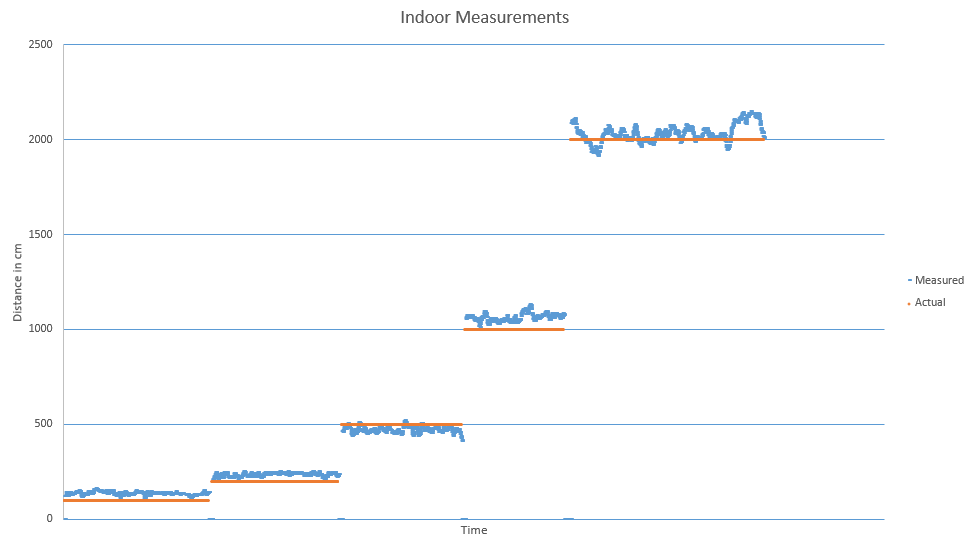
Indoor Test

I tested in my RF noisy NYC apartment using a Leica laser rangefinder as reference. Out-of-the-box default settings with the default quality-weighted range estimation.

Indoor Ranging

Outdoor test

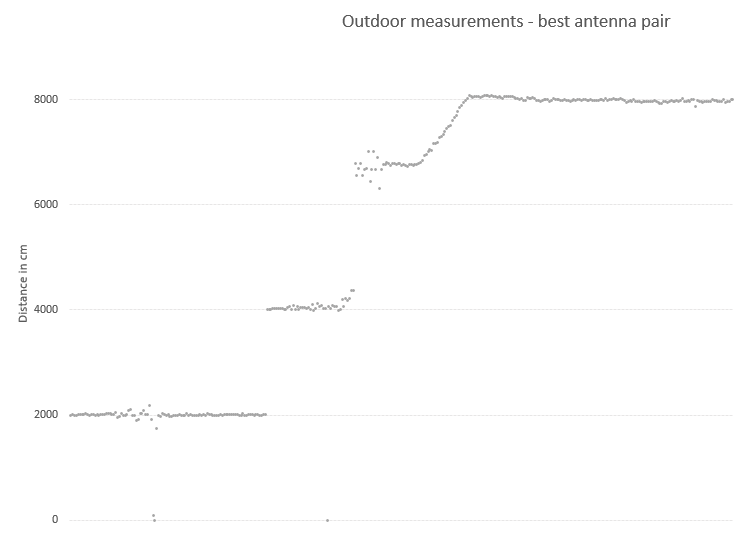
I tested in a huge, flat 20 acre field far away from any RF noise. I cranked transmit power to maximum. I logged all 4 antenna combinations (two stations each with 2 antennas). I sampled every 2000cm up to 8000cm. I forgot to turn off the radio when I walked from 6000cm to 8000cm. I used a fiber reel measuring tape for reference.

outdoor Ranging overview

Here each dot is a sample and the color indicates the sampled antenna pair.

If I filter out on the best overall pair (the grey dots), it looks like this…

outdoor Ranging single pair

This looks promising.

I think there is room for improvement by…

  1. Only using a single antenna pair optimized for the location
  2. Dynamically adjust output power based on estimated distance
  3. Filter nonsense samples and samples with low signal quality

This weekend I am going to try to test with some of these improvements, and I am going to use 3 base stations to do oversampled 2D location finding. Check back next week for results!

If all goes well, next steps are to…

  1. Design and build a stand-alone base station with an AT86RF233 and an ATTINY to do very basic . This will be battery powered with optional solar charging. Weatherproof case. Hopefully this unit can be built for less than $25 per unit so it will be possible to put lots of them around a sensing areas.
  2. Design and build a shield with just enough (chip, xtal, antenna) to make it possible for an Ardunio to be a rover. Also hopefully less than $25.
  3. Put it on a few robots and start mowing hi-res Google Earth messages!

-josh