A utility to create a static HTML website from your Twitter posts
tldr; download your data archive file from x.com and then use this webpage to convert it to a static HTML website that you can host anywhere. Make sure you also move or copy the data/tweets_media folder from the archive to the same folder your you save new tweets.html file.
Check out my exported tweets page here to see what it looks like.
If you are not sure how or why you would do this…
If you consider your tweets as part of your oeuvre, you probably want to have them available somewhere on the open internet where people, search engines, and maybe even AIs can find and freely browse them.
You might also want a local backup of all your tweets that will be accessible far into the distant future.
Here I present a utility and instructions that will allow you to download your tweets and turn them into a webpage that is…
- static (no javascript)
- self-contained (except for your media files, which are directly linked to)
- clean, boring, and durable HTML+CSS. No javascript or external includes.
- open (no need to log in)
- searchable
- well structured, so easy for both humans and computers to read
- deeply linkable
- visible in all browsers
- hostable on your own website or any place you want
Instructions
- Request your data archive from x.com https://x.com/settings/download_your_data. Note that it can take days for twitter to fulfill your request after you’ve made it.
- Once your data is ready, download the ZIP file to your local hard drive.
- Visit my export processing page at https://bigjosh.github.io/twitter-to-html/.
- Click the “Choose files” button and select the
tweets.jsfile from your archive. It is in thedatasubfolder.
-You can also optionally select yournote-tweet.jsfile in that same folder if you want the full text of long tweets in your exported website (if you don’t pick thenote-tweet.jsfile then the website will only have the first ~280 chars of each tweet.
-To select multiple files, hold thecontrolorcommandkey while clicking. - Click on the “Save your tweets.html file” button to save the new webpage file on your local machine.
- If you put the new
tweets.htmlfile in the same directory where thetweets.jsfile is located, you can open it with any web browser and see all of your tweets. If you want to put thetweets.htmlfile somewhere else and you want the media to be visible, then you will need to find thetweets_mediafolder that is inside thedatafolder inside your export and copy or move it and all of its files to that same folder that has the newtweets.html.
UPDATE 2/5/2026:
For some reason, geo-tags are not included the the export that X gives you, so this year I added a new tool (thanks Claude!) that uses the X.COM API to fill in the geo-tags for all your tweets. It is a pain in the ass, and it does cost money (for me it was $15 for 3K tweets) but it was worth it to me because I sometimes like to use the geo-tags as strausian commentary. You can read about the new tool here.
FAQ
Q: I don’t see any of the pictures or videos in my tweets?
To see your media, find the folder tweets-media in your twitter export and copy that folder and all of the files it contains (your pictures & videos) to the same folder where your newly created tweets.html file is.
The directory structure should look like this…
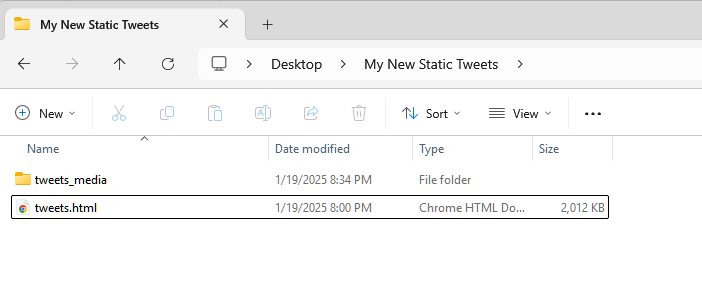
Q: Why are all my tweets truncated to 140 chars?
A: Make sure you also upload the “tweet-notes.js” file from your archive.
Q: I only see the first 280 chars of my tweets, even the ones that I know are longer.
To see your full tweets, you need to select both the tweets.js and also the note-tweet.js files from your twitter export. To be able to select multiple files, hold the control or command key while clicking each file. On mobile, you can usually press and long hold the first file and then press the second file.
Q: Privacy?
You can look inside the tweets.js and note-tweet.js files to confirm that they do not contain anything except your public tweets. The utility also runs completely locally, so you can unplug your internet connection before you start and then delete all cookies when you are done if you want to be 100% sure your data never leaves your computer.
If you are going to post your exported tweets on a webserver, make sure you copy the data/tweets_media folder out of the archive rather than putting the whole archive on the server since the archive does contain some private info like your direct messages.
Q: Can’t I just use the “Your archive.html” file inside the archive zip?
You can if you just want to look at your tweets on your computer right now, but there are some issues with the internal viewer. The big deal breakers for me were…
- only shows you the first 280 chars of your tweets. Seriously. I can not figure out any way to see your full tweets with the twitter-supplied viewer.
- relies completely on javascript to load and display the tweets so, for example, if you search for a word it might not find it unless that tweet was already loaded via scrolling.
- is flakey for me and often just stops working.
- includes other stuff besides your public tweets that you probably would not want to put in a publicly accessible place.
- is not indexable.
- is not deep linkable, so you can not, for example, make a link to a specific tweet.
- is ugly and hard to use and you have no control over how the tweets are displayed.
Q: How do I make a deep link into my tweets.html?
Add “#tweet-id” to the end of the URL of your tweets.html file where “tweet-id” is the tweet ID. You can find the tweet ID in the upper right corner of each tweet in tweets.html.
Q: I am getting [error].
Sorry, this code is very mushy because the problem is very mushy. Please leave a comment below with the exact error you are getting and I’ll fix it as soon as possible.
Q: How do I host the tweets.html file if I want it available on the public internet?
If you have a webserver, you can just put this file any place on it and it will just work since it is a simple static HTML file. If you want the media (pictures and videos) to be visible, then you need to copy the folder data\tweets_media and all of the files in it from your archive ZIP file to the same folder where your tweets.html file is.
If you do not have a web server, there are lots of ways to do it including Google Cloud Services and Amazon AWS and GitHub Pages and so many more. Google “How to host my static website”. You can do this.
Q: Why are the tweets in tweets.html shown in oldest-tweets first order?
This is an aesthetic choice. I like it that tweets inside replies and storms are in the same order as everything else, and this order just makes everything naturally flow. I also like that the page will grow downwards over time if you keep updating it, which also seems better for SEO.
But this would be easy to change and I guess I could make an option if anyone feels super-strongly about it.
Q: Why don’t I see the tweets I was replying to in the tweets.html?
If you are replying to your own tweet, then that tweet will be further up in the same file (because the replied-to tweet will always be older than the reply). The “In reply to” link will be a local relative link to that tweet inside tweets.html.
If your tweet is in reply to someone’s else tweet, then the “In reply to” link will be to that tweet on x.com. As of now you do not need to be logged into twitter for this link to work without being logged in.
I do think it would be nice to quote the replied to tweet inside tweet.html, but I chose not to implement this for a couple of reasons. Firstly, we do not have that data inside your export so would need to scrape x.com to get it and this gets ugly- or at least impolite. But also I feel like you do own your own tweets but you do not own other peoples’ tweet so seems wrong to commandeer them.
Q: What’s with “In Reply to [undefined]?
This probably means that the original tweet was deleted, or the whole account of the original tweeter was deleted.
Q: Why don’t my re-tweets link back to the re-tweeted tweet?
Because this data is just not contained in the twitter archive. And the “retweeted” field in the data is *always* set to “false”. Seriously. Check the twitter-supplied viewer and you’ll see it also does not link to the re-tweeted tweet.
Q: You should make a system where all the people who use your converter can one-click-deploy their exported tweets and the system will locally link them all to each other and network effects kick in and next thing you know the world will have an organic open shadow twitter corpus!
Yea, this is a great idea… but bit more than I want to bite off right now. But *you* should totally make it! Feel free to snipe my note-matching algorithm because no one should ever have to write that again.
Q: Where are my locations?
Sadly, locations are not included in the twitter export, despite what google and ChatGPT say. The only way to get them would be to scrape them off x.com. I might end up making a Chrome Extension to do this. :/
UPDATE 2/5/2026:
Here is new tool that can grab your geolocations using the X.COM API.
Please leave any other questions in the comments section below.
hey Josh, hope all is well with you! I’m trying to use your tool (which is exactly what I was looking for) but I ran into an error:
Error: can’t access property “tweet”, prevTweetWorkingRecord is nullvisit josh.com for more info.
I’m trying to use 3 files: tweets.js, tweets-part1.js, tweets-part2.js.
can you please advise? thank you so much!
They occasionally change the file format without notice. :/
I will order an export of my account now and update the program to match when it comes (can take a few days).
Thanks!
Thank YOU for offering us this tool. I’ll be on the lookout for any updates.
A week later, still waiting… :/
hey Josh, sorry to bother you, but did you have any news or progress on this matter? hope all is well with you! thank you!
I updated the tool about 3 weeks ago. Can you try your files again using this latest version and LMK if you are still seeing an error?